Discover ORBNET Streamforce, a video gateway for Milestone XProtect connecting edge devices, browsers and third-party systems via RTSP, SRT and more.

ORBNET Streamforce for Milestone XProtect
Have you ever been asked to get a camera feed into a system that XProtect has never met?
Perhaps a remote site needs to send video back over 4G or 5G. A drone feed needs to appear inside the control room. An external application needs access to selected XProtect cameras. Or a camera produces a perfectly valid stream that does not fit neatly into a conventional VMS integration.
These requests often sound simple:
“It is only video. Can’t we just send it over?”
Unfortunately, the moment different networks, codecs, protocols, firewalls, operating systems and security policies become involved, that simple stream can turn into a surprisingly complicated creature.
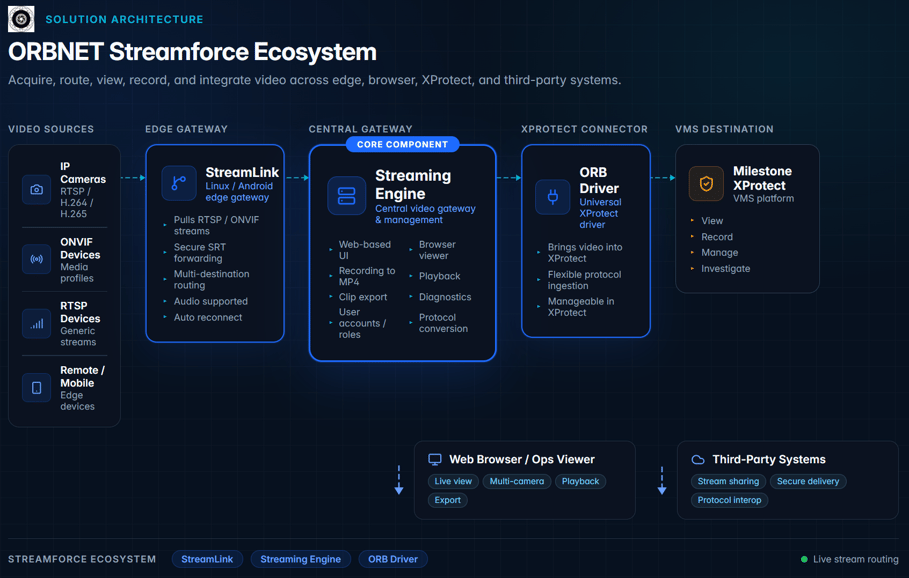
ORBNET Streamforce is a video gateway ecosystem for Milestone XProtect that helps security teams acquire, transport, convert, view, record and integrate video across edge devices, XProtect systems, browsers and third-party platforms.
Rather than treating each awkward video workflow as a new development project, Streamforce brings together three complementary products:
- ORBNET Streaming Engine, the central video gateway and distribution layer
- ORBNET StreamLink, a lightweight Linux or Android edge application
- ORB Driver, a flexible universal device driver for Milestone XProtect
Together, they provide a practical route through the protocol jungle without requiring every deployment to begin with a whiteboard, three developers and an unhealthy quantity of coffee.
What is a video gateway?
A video gateway sits between video sources, a video management system and the systems that need to consume the video.
Depending on the project, it may need to:
- Retrieve video from XProtect
- Bring external video into XProtect
- Convert or redistribute streams using different protocols
- Securely move video across unreliable networks
- Provide browser or mobile viewing
- Record selected sources independently
- Connect remote sites without requiring a full VMS at every location
- Present unusual or unsupported sources as manageable XProtect cameras
No single protocol or interface solves all of those problems.
RTSP is widely supported but can become awkward across firewalls and unreliable networks. RTMP remains useful for publishing video to cloud and broadcast services. HLS is highly browser-friendly but introduces additional latency. WebRTC is useful for interactive low-latency viewing. SRT provides secure and resilient delivery across public, cellular and otherwise imperfect networks.
Streamforce is designed to let integrators choose the right transport for each part of the workflow, rather than trying to force every stream through the same digital keyhole.
From Streaming Engine to the Streamforce ecosystem
Our original guide focused primarily on streaming video out of Milestone XProtect using the ORBNET Streaming Engine.
That remains an important part of the platform, but it no longer tells the full story.
The Streaming Engine has developed into a broader video management and distribution service. StreamLink extends that capability out to remote and mobile edge devices, while ORB Driver provides the final bridge for bringing external streams into Milestone XProtect.
The result is an edge-to-core ecosystem that can move video in either direction:
Cameras and edge devices → StreamLink → Streaming Engine → third-party systems or browsers
and:
External video sources → Streaming Engine or StreamLink → ORB Driver → Milestone XProtect
This allows Streamforce to support video workflows across remote sites, drones, mobile units, third-party systems, web viewers and central XProtect environments.
ORBNET Streaming Engine: the central video gateway
The ORBNET Streaming Engine is the central distribution and protocol-conversion layer within the Streamforce ecosystem.
It can retrieve video from Milestone XProtect, ingest external sources and redistribute video to other systems using the protocol best suited to the destination.
That might mean:
- Providing an RTSP or RTSPS stream to another security platform
- Sending video over SRT to a remote monitoring centre
- Publishing an RTMP stream to a cloud or broadcast service
- Providing HLS, LL-HLS or WebRTC video to modern viewers
- Supplying MJPEG to a legacy application
- Receiving a remote stream that will later be presented to XProtect through ORB Driver
The same source can also be distributed through more than one route or protocol. A camera could, for example, be delivered to a remote control room over SRT while also being made available to an authorised browser-based viewer.
Streamforce does not assume that video only travels out of XProtect. It supports a broader model in which video may originate in XProtect, at a remote edge device, from a drone, from another VMS or from a third-party application.
What has changed in the Streaming?
Since our original article, the Streaming Engine has gained a substantial collection of new operational capabilities.
A redesigned web-based interface
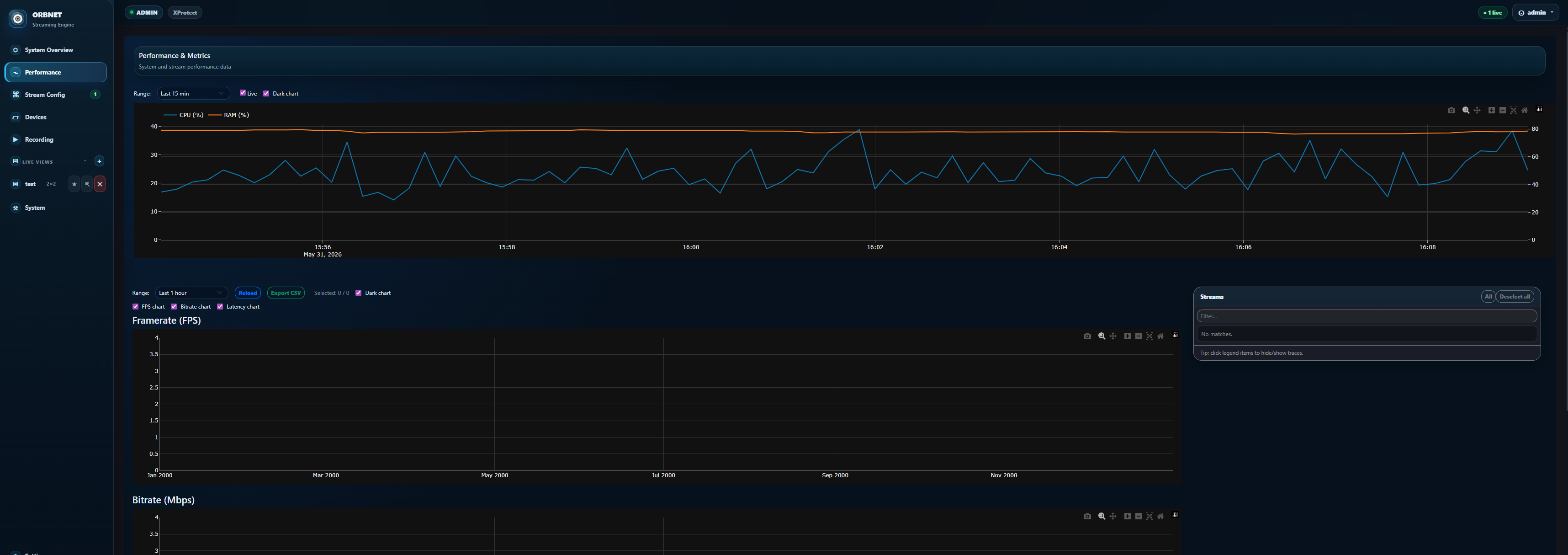
The Streaming Engine now includes a redesigned web-based user interface.
Configuration and operational information are brought together into a modern interface that can be accessed through a browser. This gives integrators and operators a clearer view of sources, routes, destinations, recording status and system health without relying solely on traditional configuration tools.
Built-in browser viewing
The Streaming Engine now has its own browser-based live viewer.
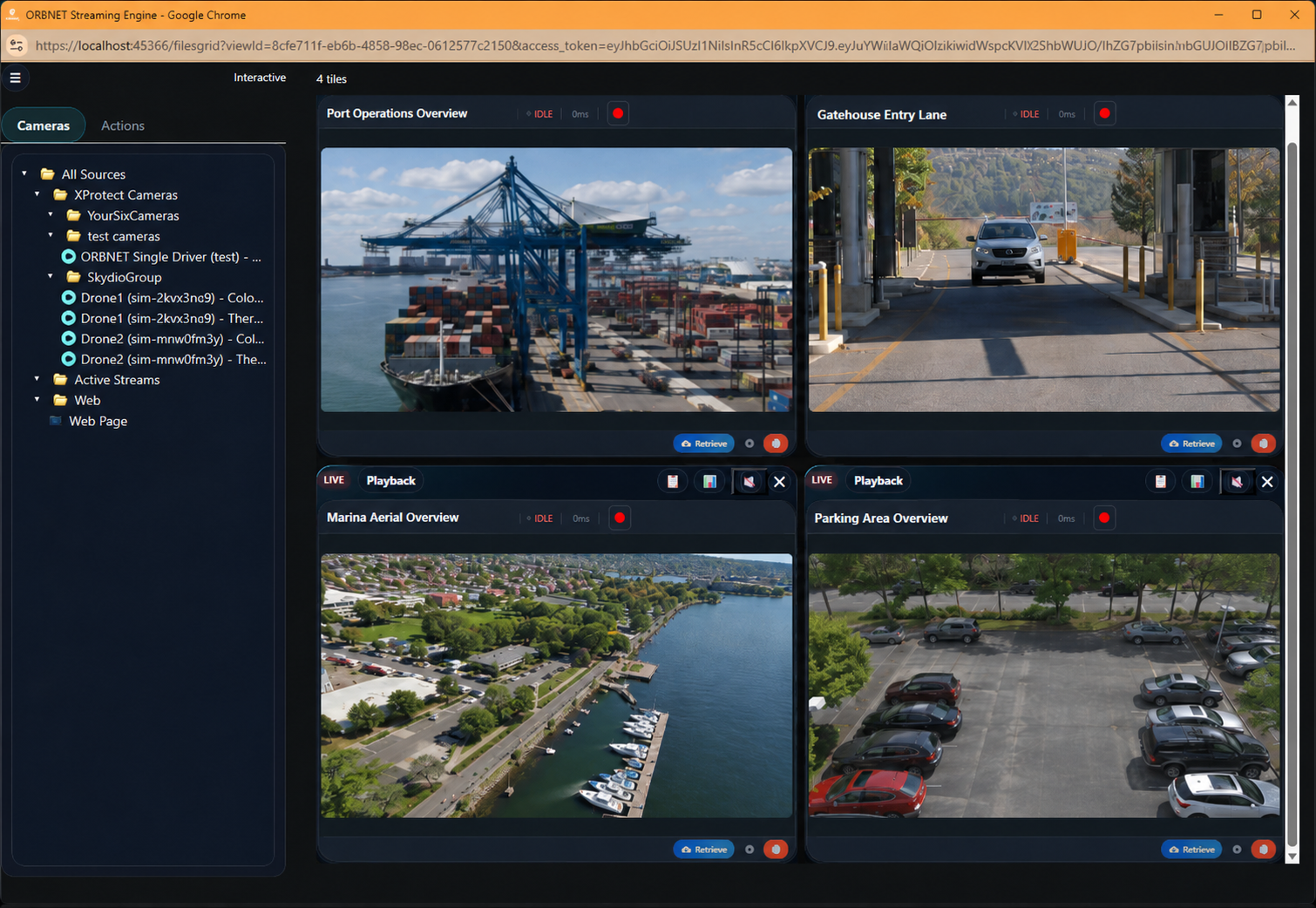
Authorised users can view streams directly without installing a dedicated desktop client. Multi-camera web views are supported, and the interface is designed to work across desktop and mobile devices.
This can be particularly useful for:
- Temporary control rooms
- Remote support teams
- Operational users who do not require the full XProtect Smart Client
- Mobile personnel
- Short-term incident or event access
- Browser-based monitoring stations
It does not replace XProtect as the central VMS. It provides an additional viewing option for situations where deploying a full VMS client would be unnecessary or impractical.
Local recording and playback
The Streaming Engine can record directly connected or configured camera sources as MP4 files on disk.
These recordings can be accessed through the Streaming Engine’s playback interface, allowing users to review video recorded locally by the engine. Recording schedules and retention controls can be configured to determine when video should be recorded and how long it should remain available.
Users can also export or download selected clips.
It is important to distinguish this from XProtect playback. The Streaming Engine’s web playback interface currently plays recordings made locally by the Streaming Engine. It does not directly browse or play existing recordings stored within XProtect.
The engine can still retrieve live or playback video from XProtect for supported outward streaming workflows, but that is separate from its local browser-based recording archive.
Stream health and diagnostics
In a simple test environment, a stream either works or it does not. In a real deployment, life is rarely that considerate.
Networks fluctuate. Remote devices disappear. Credentials change. Firewalls acquire opinions. A technically connected stream may still be dropping packets, reconnecting repeatedly or delivering no useful media.
The updated interface includes stream health and diagnostic information to help identify these conditions. This gives integrators a clearer view of stream status and makes it easier to distinguish a gateway issue from a source, destination or network problem.
User accounts, roles and access control
The Streaming Engine now includes user and role management.
This allows access to configuration, viewing, playback and other functions to be controlled according to the responsibilities of each user. It is particularly relevant where browser viewing or recording access is being provided to operational teams outside the core VMS administration group.
Expanded protocol and audio support
Support continues to expand across video, audio and transport technologies.
Supported video codecs include:
- H.265, also known as HEVC
- H.264
- MPEG-4
- MPEG-2
- MPEG-1
- MJPEG
Supported audio formats include:
- AAC
- AC-3
- MPEG-1 and MPEG-2 audio
- PCM
- GSM
- G.711
- G.722
- G.729
- Opus
Available transport options include:
- RTSPS, providing secure RTSP streaming over TLS
- UDP, using standard RTP transport
- TCP interleaved, carrying media and control through a single connection
- RTSP over HTTP, allowing RTSP traffic to be tunnelled through HTTP or HTTPS-friendly network paths
- Multicast, supporting efficient one-to-many delivery on suitable networks
The Streaming Engine also supports pull-based RTMP workflows. RTMP is more commonly encountered as a push protocol, but some systems expose an RTMP source that another application must connect to and retrieve. Pull RTMP support covers those less common, but still perfectly real, integrations.
ORBNET StreamLink: bringing edge video back securely
Not every camera is located on the same network as the VMS.
Modern surveillance environments increasingly include:
- Remote compounds
- Temporary sites
- Vehicles
- Drones
- Mobile observation units
- Pop-up command centres
- Cameras connected through cellular networks
- Small sites where installing a full Windows server would be excessive
ORBNET StreamLink is a lightweight edge application designed for these environments.
It runs on Linux or Android hardware using ARM64 or x64 architectures. Suitable platforms can include Raspberry Pi-class single-board computers, compact mini PCs, tablets and other appropriately specified edge devices.
StreamLink can discover ONVIF devices, retrieve their media profiles and connect directly to RTSP sources. It then forwards the selected video and audio streams securely using SRT.
Why use SRT at the edge?
RTSP works extremely well inside predictable local networks. It is less comfortable when asked to cross cellular links, public internet connections or networks where latency and packet loss vary from minute to minute.
SRT is designed for this sort of untidy journey.
It provides encryption, packet-loss recovery and configurable latency management while remaining suitable for low-latency live video. This makes it useful for moving surveillance video from distributed sites back to a central Streaming Engine.
Multiple streams, routes and destinations
StreamLink can acquire more than one stream from a device and forward streams to multiple routes or destinations.
A source could therefore be sent to:
- A primary Streaming Engine
- A secondary Streaming Engine
- A separate operational platform
- Two receiving sites over different network connections
This allows integrators to design resilience into the transport architecture instead of relying on one destination or network path.
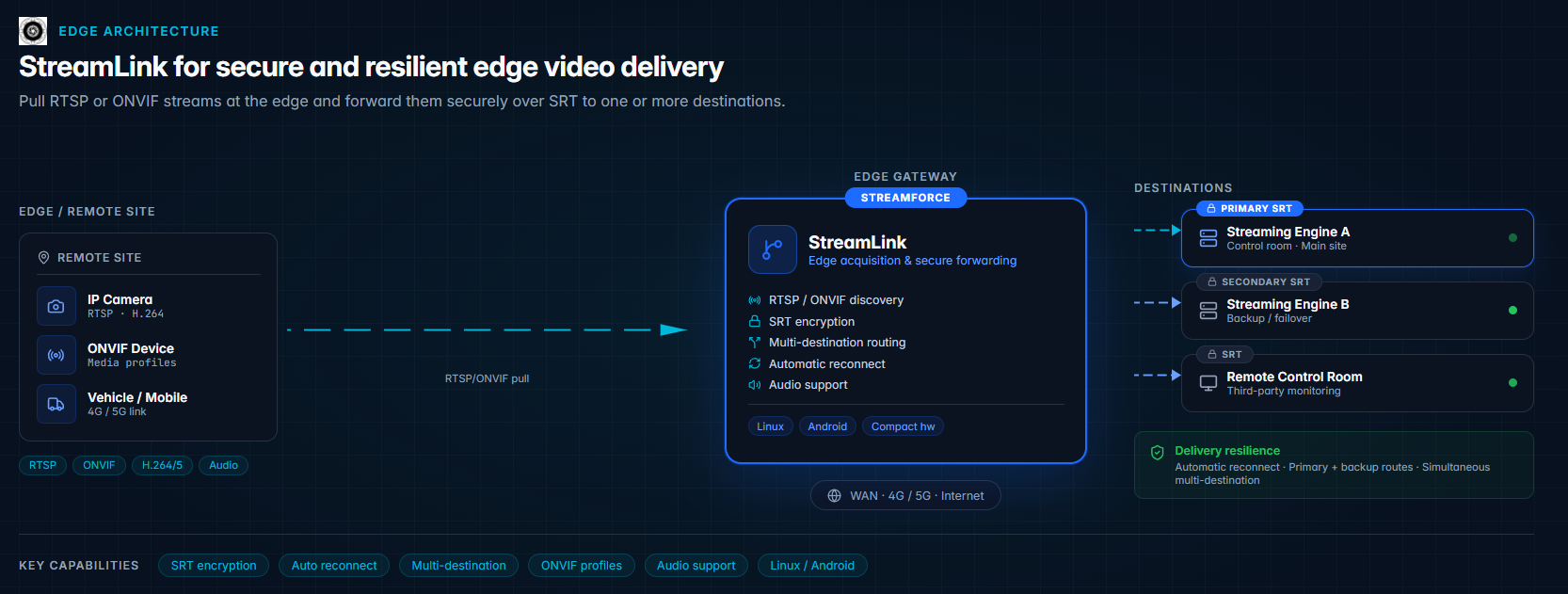
StreamLink automatically reconnects following network interruptions and supports encrypted SRT delivery. It does not currently transcode, buffer or record video at the edge. Its job is intentionally focused: acquire the source and deliver it securely and reliably.
Configuration is handled through StreamLink’s own dedicated web interface rather than through the central Streaming Engine.
ORB Driver: bringing external video into XProtect
Moving video out of XProtect is only half the story.
Security teams also need to bring video into XProtect from sources that may not have a conventional native device driver. These could include:
- Remote SRT feeds
- Drone video
- Mobile cameras
- Streams produced by analytics applications
- Video from another VMS
- Temporary or rapidly deployed devices
- Encoders and gateways
- Custom operational systems
ORB Driver is a flexible universal device driver that presents supported external video streams to Milestone XProtect as manageable cameras.
Once configured, the external source can be treated as part of the wider XProtect environment. Depending on the stream and configuration, operators can view, record and manage it through familiar XProtect workflows.
ORB Driver supports sources using protocols including RTSP, RTSPS, RTMP, RTMPS, SRT, RTP, WebRTC, HLS, MPEG-TS, MPEG-DASH and MJPEG. It also supports H.264 and H.265 streams up to 4K, along with supported audio and metadata workflows.
This is particularly useful when StreamLink has transported video from a remote site to the central environment. The Streaming Engine receives or redistributes the stream, and ORB Driver provides the final step into XProtect.
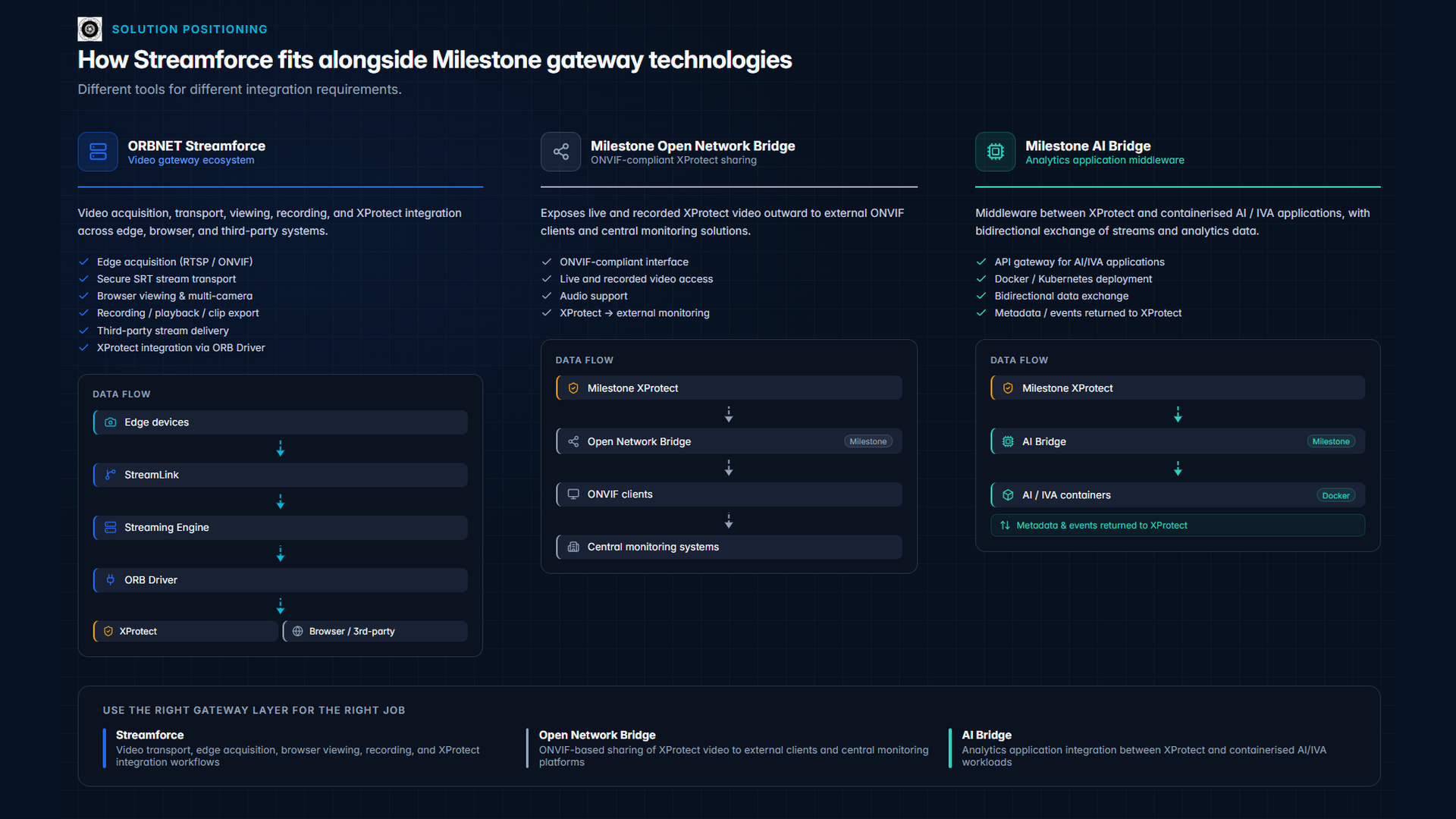
Where does Milestone Open Network Bridge fit?
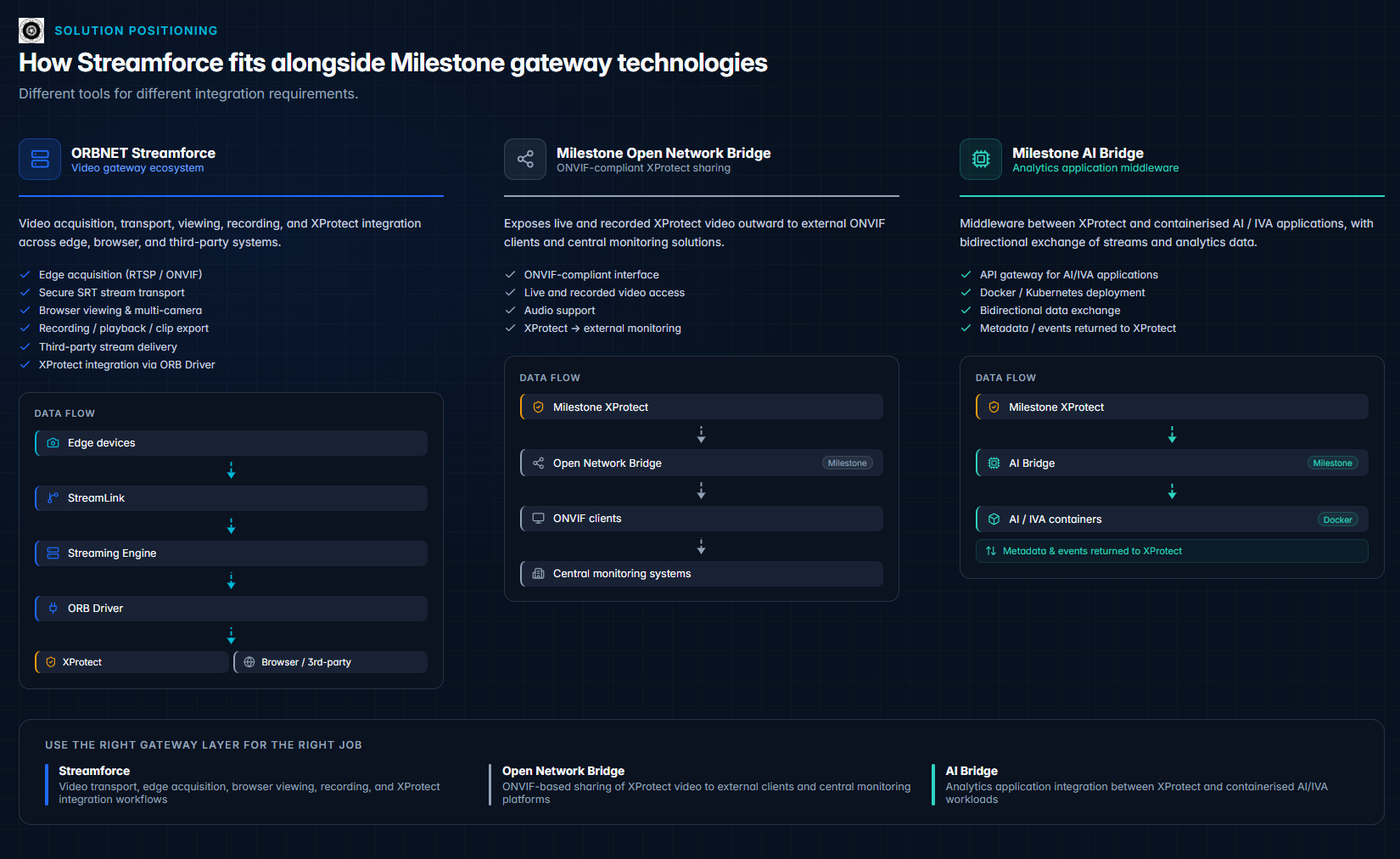
Milestone Open Network Bridge and ORBNET Streamforce solve different problems.
Milestone Open Network Bridge provides an ONVIF-compliant interface for sharing video from XProtect with external ONVIF clients.
It allows authorised third-party systems to access live and recorded XProtect video through standardised ONVIF and RTSP interfaces. Typical consumers might include:
- Law enforcement systems
- Central monitoring platforms
- Another ONVIF-compatible VMS
- Surveillance centres
- Alarm receiving centres
It supports external access to H.264 and H.265 video from XProtect, including live and recorded video, along with supported live audio.
This makes Open Network Bridge a sensible option when the receiving system is an ONVIF client and the requirement is specifically to expose XProtect-managed video through an ONVIF-compliant interface.
The ORBNET Streaming Engine does not expose an ONVIF server interface.
Streamforce therefore should not be described as an RTSP-to-ONVIF gateway.
The relationship is better explained this way:
- Use Open Network Bridge when an external ONVIF client needs standardised access to XProtect video.
- Use Streamforce when the requirement involves edge acquisition, SRT transport, protocol redistribution, browser viewing, local recording or bringing unconventional sources into XProtect.
- In larger environments, both may be used for different parts of the overall architecture.
Where does Milestone AI Bridge fit?
Milestone AI Bridge also addresses a different integration layer.
It is designed to connect XProtect with intelligent video analytics applications running in Docker containers. It acts as an API gateway, providing a two-way exchange in which video can be sent from XProtect to an analytics application and the resulting metadata, events, annotations or video can be returned to the VMS.
Milestone describes AI Bridge as using cloud-native technologies and supporting scalable Docker or Kubernetes deployments, including GPU-accelerated analytics processing.
That makes it particularly suitable for developers building containerised intelligent video analytics integrations.
Streamforce has a broader video transport role. It deals with acquiring video from edge devices, moving it securely between networks, redistributing it through standard streaming protocols, providing browser access and presenting external sources to XProtect through ORB Driver.
A useful distinction is:
- AI Bridge connects XProtect to containerised analytics applications and returns analytics information.
- Streamforce moves and manages video between edge devices, XProtect, viewers and third-party systems.
There is currently no planned direct Streamforce-to-AI Bridge architecture. However, they can exist as complementary components within a broader security environment where different parts of the system require different gateway functions.
Typical Streamforce deployment scenarios
Connecting a remote site to XProtect
A remote site has several ONVIF cameras but no local XProtect server.
StreamLink runs on a compact Linux edge device, discovers the cameras and retrieves their selected media profiles. The streams are encrypted and sent over SRT to the central environment.
At the receiving end, ORB Driver presents the streams to XProtect as manageable cameras.
Providing resilient mobile video
A mobile unit or temporary deployment needs to deliver video to more than one control room.
StreamLink retrieves the local RTSP stream and creates separate SRT routes to two destinations. If one destination becomes unavailable, the other route can continue operating. Automatic reconnection helps recover from interruptions as the underlying cellular connection changes.
Sharing selected XProtect cameras with another platform
A third-party operational platform needs access to selected XProtect cameras but does not support ONVIF or the integration requires protocols other than those exposed by Open Network Bridge.
The Streaming Engine retrieves the required XProtect streams and redistributes them using the appropriate protocol, such as RTSP, RTSPS, SRT, RTMP, HLS or WebRTC.
Browser-based operational viewing
A temporary operations team needs access to a group of cameras but does not require the complete XProtect Smart Client.
The Streaming Engine provides a multi-camera browser view that can be accessed from desktop or mobile devices. Permissions can be controlled using user accounts and roles.
Where local recording is enabled, authorised users can also review Streaming Engine recordings and export selected MP4 clips.
Bringing drone or specialist video into XProtect
A drone, encoder or specialist device produces an RTMP, RTSP or SRT feed.
The feed is received through the Streamforce ecosystem and presented to XProtect using ORB Driver. Operators can then work with the video inside their normal VMS environment rather than monitoring a separate standalone application.
Connecting systems across segmented networks
A high-security or industrial deployment may contain multiple network zones with strict controls on which systems can communicate directly.
Streaming Engine instances can be positioned at appropriate points within the architecture to provide controlled video distribution between permitted zones, rather than opening unrestricted access between the original source and every consumer.
Scale and deployment considerations
A typical Streaming Engine deployment can support approximately 50 to 200 Full HD streams at 15 frames per second, depending on factors including:
- Hardware specification
- Source bitrate
- Video and audio codecs
- Input and output protocols
- Number of simultaneous destinations
- Recording requirements
- Whether streams can be passed through natively
- Network capacity
- Any required media processing
This should be treated as a design range rather than a fixed maximum. Two hundred low-bitrate streams being passed through to one destination is a very different workload from two hundred streams being recorded, redistributed and viewed by multiple users.
The Streaming Engine supports:
- Windows 11
- Windows Server 2019
- Windows Server 2022
- Windows Server 2025
Capacity planning should consider both total incoming bandwidth and the outgoing bandwidth created by each destination. A 4 Mbps source sent independently to five viewers or systems may require considerably more network capacity than the original camera feed alone.
Recording also introduces disk-throughput and storage requirements. Retention calculations should be based on actual camera bitrates rather than resolution labels, as two Full HD cameras can consume very different amounts of storage depending on scene complexity and encoding settings.
Choosing the right gateway approach
There is no universal “best” video gateway for every Milestone XProtect project.
The correct choice depends on what needs to be connected.
Choose Milestone Open Network Bridge when:
- The consumer is an ONVIF client
- Live or recorded XProtect video must be shared through a standardised ONVIF interface
- The workflow is primarily XProtect-to-external-system video access
Choose Milestone AI Bridge when:
- The integration involves a containerised IVA application
- Video must be exchanged with Docker-based analytics
- Analytics metadata, events or annotations must be returned to XProtect
- The project is being developed around the AI Bridge API model
Choose ORBNET Streamforce when:
- Video needs to travel between different protocols or network environments
- Cameras must be acquired at a Linux or Android edge device
- SRT is required for secure and resilient transport
- External streams need to be brought into XProtect
- Browser-based live viewing is required
- Independent MP4 recording and playback are needed
- Multiple destinations or resilient routes are required
- The workflow does not fit neatly into a single standard VMS interface
In many enterprise environments, the final answer may involve more than one of these components. They are not three differently shaped hammers competing for the same nail. They are different architectural tools intended for different layers of the video workflow.
Frequently asked questions
What is ORBNET Streamforce?
ORBNET Streamforce is a video gateway ecosystem for Milestone XProtect. It consists of the Streaming Engine, StreamLink and ORB Driver, providing tools for acquiring, transporting, converting, viewing, recording and integrating video.
Can Streamforce send video out of Milestone XProtect?
Yes. The Streaming Engine can retrieve selected XProtect video and distribute it to external systems or viewers using supported protocols such as RTSP, RTSPS, RTMP, SRT, HLS, WebRTC and MJPEG.
Can Streamforce bring RTSP or ONVIF cameras into XProtect?
Yes. StreamLink can discover ONVIF devices, retrieve ONVIF media profiles and connect to RTSP sources. The resulting streams can be transported to the central environment and presented to XProtect through ORB Driver.
Is Streamforce an RTSP-to-ONVIF gateway?
No. The Streaming Engine does not provide an ONVIF server interface.
Milestone Open Network Bridge is the appropriate Milestone component when an external ONVIF client needs standardised access to live or recorded XProtect video.
Can the Streaming Engine record video without XProtect?
Yes. The Streaming Engine can record configured camera sources directly to MP4 files on disk. These local recordings can be reviewed using the browser-based playback interface and selected clips can be exported or downloaded.
The browser playback interface does not currently provide direct playback of recordings stored inside XProtect.
Can StreamLink send video to multiple destinations?
Yes. StreamLink can configure multiple routes or destinations for a source. This can be used to deliver video to separate systems or to build resilience into the deployment.
Does StreamLink record video at the edge?
No. StreamLink is focused on acquiring and securely forwarding video. It does not currently provide edge recording, buffering or transcoding.
How many streams can the Streaming Engine support?
A typical deployment may support approximately 50 to 200 Full HD streams at 15 fps. The actual number depends on hardware, bitrates, protocols, destination count, recording requirements and the amount of media processing involved.
Video in. Anywhere out.
Video no longer belongs to one camera, one server or one control room.
It may begin at a remote site, travel through a cellular network, enter Milestone XProtect, pass through an analytics platform, appear in a browser and be securely shared with another organisation during an incident.
The difficult part is rarely producing the video. The difficult part is moving it between all those places reliably, securely and in a format each system understands.
ORBNET Streamforce provides a practical ecosystem for doing exactly that.
To see how the Streaming Engine, StreamLink and ORB Driver could fit into your Milestone XProtect environment, speak to ORBNET about a demonstration, trial or solution architecture session.