Learn how schools can connect access control, alarm events and video in Milestone XProtect without replacing every existing system.

School security workflows
Most schools do not have a shortage of security systems. They already have cameras, access control and alarms. The difficulty starts when those systems all tell separate stories.
Last week, we launched the ORBNET Education Bundle for Milestone XProtect .
Now, “bundle” can be a slightly dangerous word. It can sound as though somebody has taken three products, put them in the same price list and hoped the new name would do the heavy lifting.
That is not really the point here.
The important part is the operating model. We are looking at how a school, college or multi-academy trust can bring access events, alarm activity and relevant video into one practical workflow inside Milestone XProtect.
I wanted to explain why we put the bundle together, what the workflow actually looks like, and why standardising the response can sometimes be more valuable than forcing every school to replace the systems it already owns.
The systems may be connected to the same building, but not to each other
Imagine a fairly ordinary security event.
A side door has been held open. The access-control system knows about the door. The video system has a camera looking at it. The alarm system may also be monitoring the surrounding area.
Technically, all the information exists.
Operationally, somebody may still need to:
- Notice the access-control event
- Work out which camera covers the door
- Open a separate video application
- Find the correct live or recorded view
- Decide whether the event is accidental or suspicious
- Work out who needs to be informed
None of those individual steps sounds especially difficult. The problem is that incidents are not normally considerate enough to arrive one at a time while everybody is sitting quietly at a desk.
Reception may be busy. An estates team may be moving between buildings. A safeguarding lead may need an answer quickly. At trust level, the person responding may not know every camera name, door number or local alarm zone.
The systems have produced data, but the operator still has to assemble the incident by hand.
A door event, an alarm and a nearby camera may all relate to the same incident. The workflow should make that relationship obvious.
What does a joined-up school-security workflow actually mean?
It does not necessarily mean replacing every panel, reader, camera and server with one manufacturer’s equipment.
It means making the information useful at the point where somebody needs to make a decision.
In practical terms, that could mean:
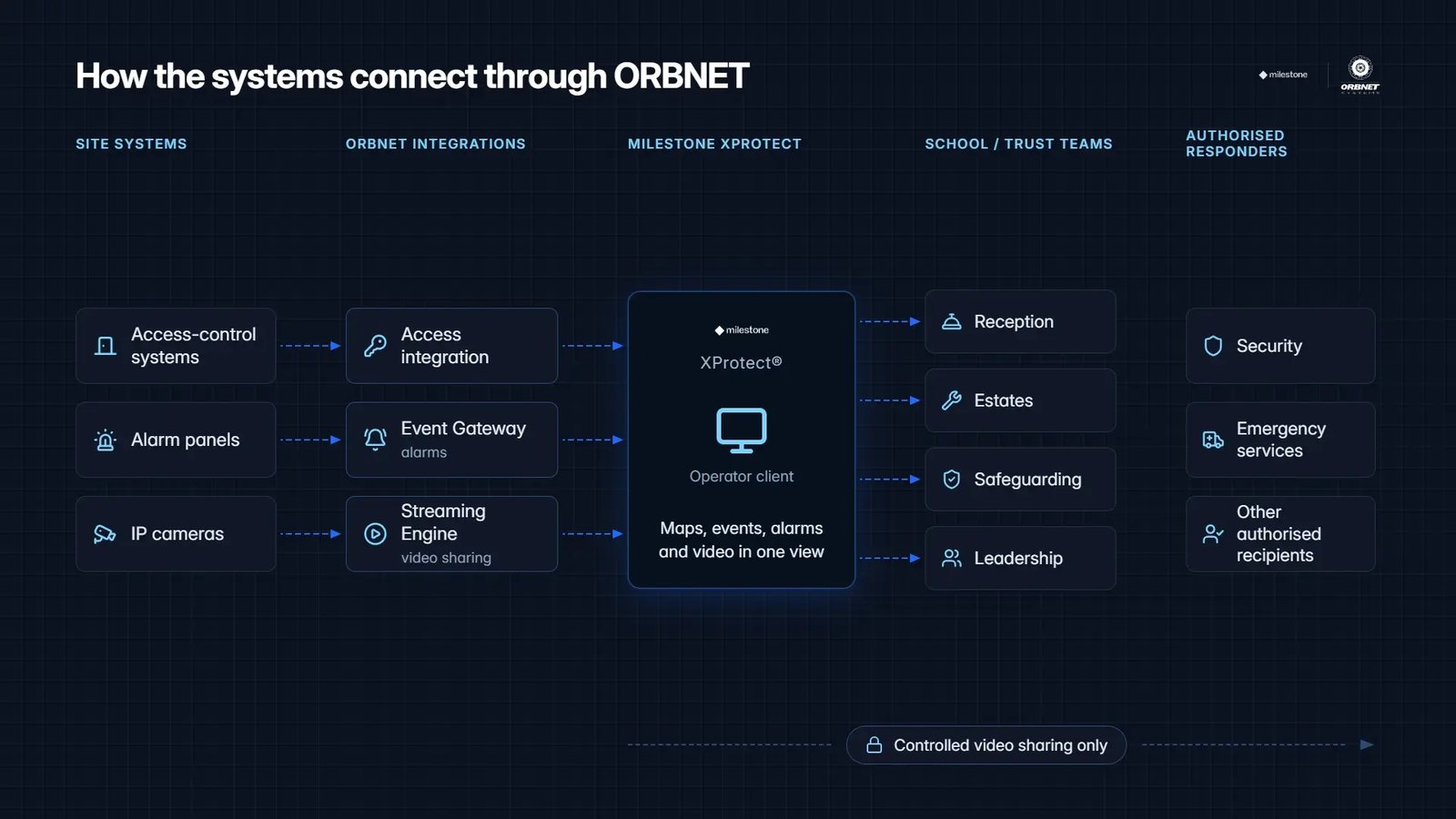
- Access events appearing inside the XProtect operator workflow
- Doors being associated with the cameras that can verify them
- Intrusion or panic alarms appearing alongside relevant video
- Operators following a consistent verification and escalation process
- Selected incident video being shared without exposing the entire VMS
Milestone XProtect becomes the common operating layer. The existing systems continue doing what they are designed to do, while ORBNET integrations help bring their information into a more useful operational context.
That distinction matters. We are not trying to make XProtect pretend to be every access-control or alarm-management platform. We are trying to make sure the person responding to an incident does not need to conduct a small archaeological dig across several applications.
Three practical examples
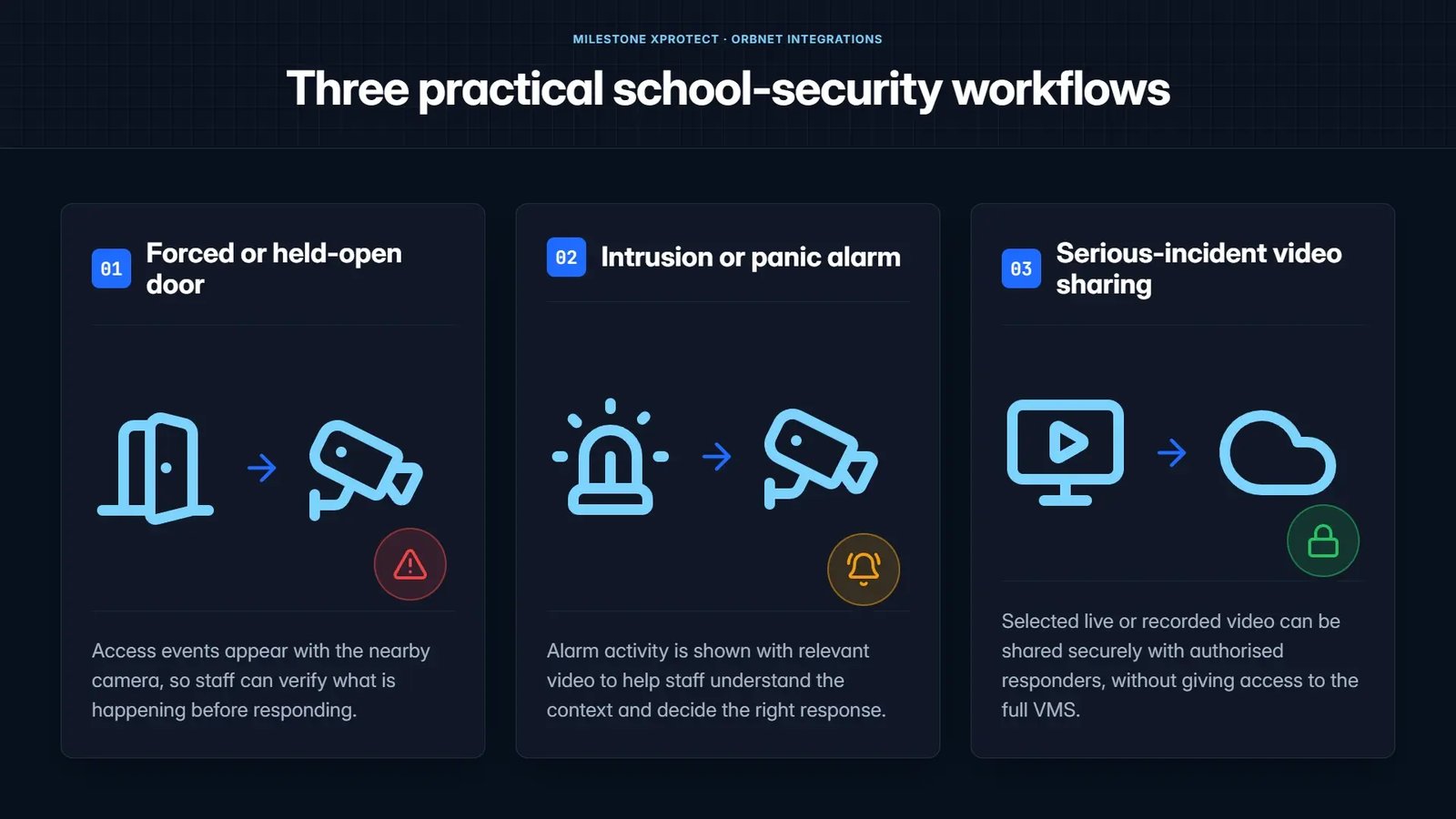
The complete requirement will vary between schools, but three workflows come up repeatedly.
1. A forced or held-open door
An access event appears with the nearby camera, allowing staff to see what is happening before responding.
A held-open door might be a delivery, a pupil moving equipment, a member of staff who has forgotten to close it, or something that genuinely needs attention. The event alone cannot tell you which.
Adding video context allows the operator to make a much better decision without first searching for the right camera.
2. An intrusion or panic alarm
Alarm activity can be brought into XProtect and connected with relevant cameras, maps and response procedures.
The objective is not simply to generate another pop-up. It is to help the operator understand whether the alarm appears accidental, operational or serious enough to escalate.
ORBNET Event Gateway is designed for this sort of alarm and event integration. It provides a software layer for receiving supported events from alarm panels, making them available to Milestone XProtect and, where required, transmitting alarm information onwards to monitoring workflows.
3. Sharing video during a serious incident
There are situations where an authorised external team needs to see selected live or recorded video, but should not receive access to every camera, user and function inside the school’s XProtect environment.
This is where controlled video sharing becomes important.
The aim is to make the right video available to the right people for the duration of the incident, without turning temporary assistance into unrestricted VMS access.
ORBNET Streaming Engine provides the video distribution layer, retrieving selected video from XProtect and making it available through the protocol or viewing route appropriate to the authorised recipient.
Different systems at each school do not have to mean different procedures
This is particularly relevant to multi-academy trusts and education groups.
Estates grow over time. Schools join with existing infrastructure, contracts and local preferences. One site may use Paxton Net2, another TDSi GARDiS, while others may have Brivo, LenelS2 NetBox or something completely different.
The same is true of alarm systems. A trust may inherit several panel manufacturers, different monitoring arrangements and different ideas about what constitutes a priority event.
Replacing everything at once might create technical consistency, but it can also create a very large bill and a considerable amount of disruption.
A more practical approach may be to standardise the parts that directly affect the response:
- Which events are brought into XProtect
- Which cameras are associated with doors and alarm areas
- How events are presented to operators
- Who is responsible for verification and escalation
- Which video may be shared
- How activity is recorded and audited
In other words, standardise the operating model first. Change the underlying technology where there is a good reason to do so, rather than simply because another school uses something different.
Existing ORBNET access-control integrations
The current ORBNET range includes dedicated Milestone XProtect integrations for platforms including:
This is not only a control-room problem
When we talk about security integration, it is easy to picture a large control room with a wall of monitors and a team of full-time operators.
Some education estates have exactly that. Many do not.
The people involved may include:
- Reception teams
- Estates and facilities staff
- Safeguarding leads
- School leadership
- Central trust operations
- Security personnel
- Authorised external responders
Each group has a different role. That does not mean each group needs unrestricted access to every system.
A good workflow should make the relevant information available to the person who needs it, while maintaining sensible permissions and control.
Can schools retain their existing systems?
Often, yes.
That does not mean every product can automatically be connected, and I would be suspicious of anybody who claimed otherwise without first looking at the estate.
The correct starting point is to identify:
- Which access-control platforms are installed
- Which alarm panels and protocols are in use
- Which versions of Milestone XProtect are deployed
- Which events are operationally important
- Which cameras should be associated with those events
- What the expected response should be
Standard ORBNET integrations may already cover the required systems. Where they do not, we can assess whether the requirement can be met through an existing protocol, a configurable integration or additional development.
The important thing is not to begin with “Which new boxes should we buy?” Begin with “What should happen when this event occurs?”
A practical phased approach
Trying to solve an entire education estate in one go can produce a very impressive spreadsheet and a very slow project.
I would normally start more simply.
PHASE 1
Understand the estate
Document the systems, sites, users and current response procedures.
PHASE 2
Select priority workflows
Choose a small number of events where visual verification adds clear value.
PHASE 3
Pilot one site
Confirm event accuracy, camera associations, permissions and operator usability.
PHASE 4
Standardise and expand
Apply the agreed model while adapting the technical integration to each site.
Questions worth asking before choosing the technology
Before designing the solution, I would ask:
- Can the existing access-control systems integrate with XProtect?
- Which alarm events need immediate visual verification?
- Are the correct cameras associated with doors and alarm areas?
- Who should be able to acknowledge and escalate an incident?
- Who may view or share incident video?
- Can external responders receive selected video without full VMS access?
- Can the operating model be introduced one site at a time?
- How should each action be logged and audited?
Those answers will tell you far more about the required solution than a list of product names on its own.
ORBNET Education Bundle
One operating model for access, alarms and controlled video sharing
The ORBNET Education Bundle brings supported access-control integration, alarm response and controlled incident video sharing together around Milestone XProtect.
It is designed for schools, colleges and multi-academy trusts that want more consistent incident handling without automatically replacing every access-control or alarm platform already in use.

Milestone Technology Program
ORBNET Systems is a Select Partner
ORBNET develops specialist integrations and operational workflows around Milestone XProtect, covering video movement, alarm handling, access control, mapping and custom development.
Wider ORBNET solutions for education
The Education Bundle focuses on access events, alarm response and controlled incident video sharing. ORBNET also supports wider education requirements including multi-site monitoring, maps, specialist video integration and evidence workflows.
Explore ORBNET solutions for educationFinal thought
School security does not become unified simply because every system is connected to the same network.
It becomes unified when the person responding can see the event, understand the context and take the appropriate action without having to reconstruct the incident across several separate applications.
That is the problem we are trying to solve with the Education Bundle.
The technology matters, of course. But the workflow comes first.
Map your current school-security workflow
We can review your Milestone environment, access-control systems, alarm-panel estate and priority incident scenarios to identify how a joined-up operating model could work across your sites.