Learn when to use VideoMon, Smart Wall, Matrix or native XProtect rules to control Smart Client displays from HMIs and automation platforms.

Most control rooms do not have a video problem. They have a coordination problem.
The video may sit inside Milestone XProtect, but the operational decision is often happening somewhere else: an alarm platform, access-control system, industrial HMI, transport-management platform or building-management system.
I have seen this pattern in transport, manufacturing, building management and wider security operations. The external system detects the problem and already knows the affected asset, area or process. In many cases, it also knows exactly which cameras the operator needs to see.
The awkward bit is getting those cameras onto the correct XProtect Smart Client display without asking the operator to search for them, build a view and move it onto the right monitor while the incident is unfolding.
That is where externally controlled display management starts to make sense.
The design question
Which system should own the display logic: Milestone XProtect or the external control system?
What Does External Smart Client Control Mean?
External Smart Client control means that a system outside XProtect can decide what appears on one or more XProtect Smart Client displays.
That external system might be:
Industrial HMI or SCADA
Process, production and operational control systems.
Building Management
Plant, environmental, fire and facilities alarms.
Alarm Management
Platforms coordinating security and incident workflows.
Transport Control
Rail, road, airport and wider transport-management systems.
Touch Panels
Hardware controllers and operator consoles.
Custom Applications
Bespoke dashboards, PSIMs and command applications.
Rather than simply telling XProtect that an event has occurred, the external system can issue a much more specific instruction.
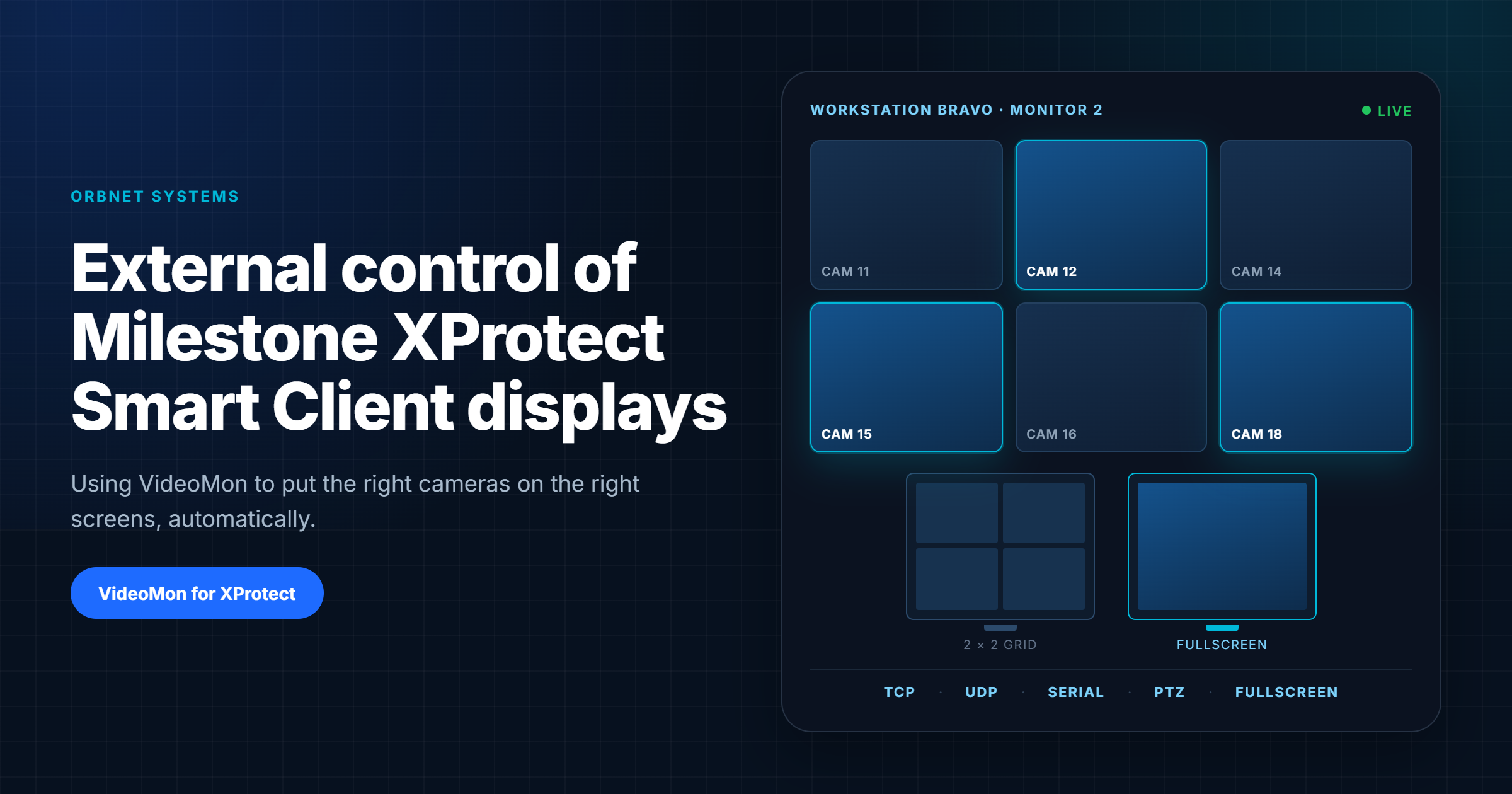
Display cameras 12, 15 and 18 on workstation Bravo, monitor 2, using a two-by-two layout. Place camera 12 in the first tile and show it fullscreen.
That is a different requirement from creating an alarm or triggering a recording rule. The external system is not only reporting that something happened. It is controlling the operator's display environment.
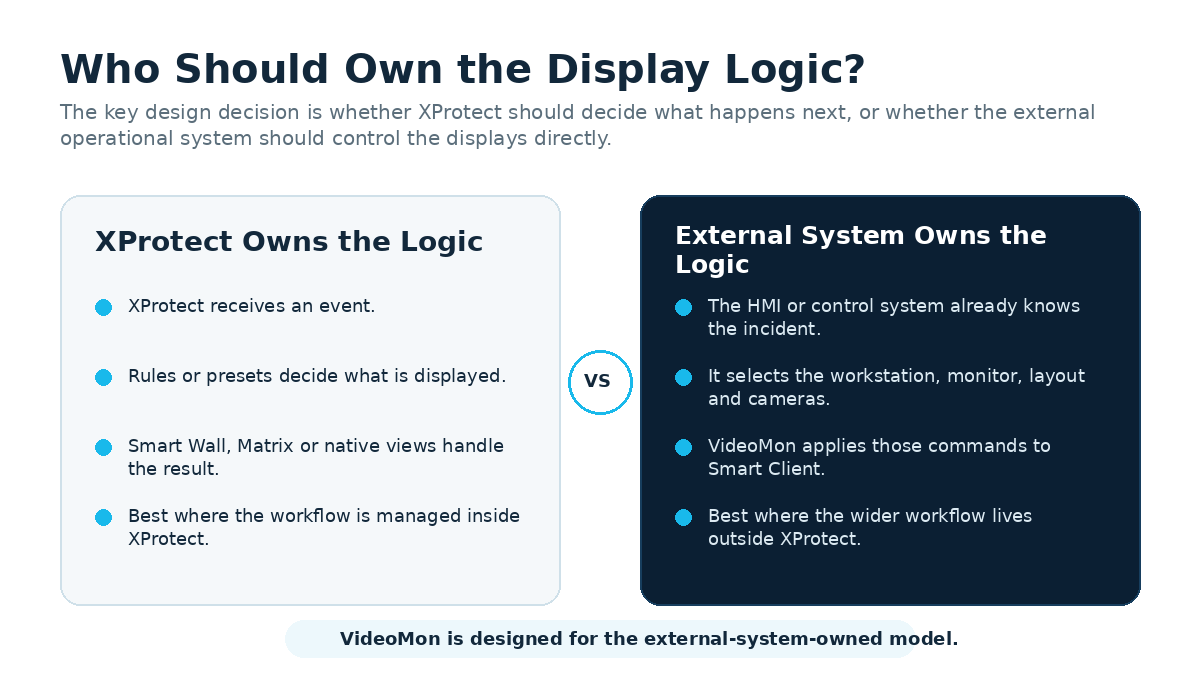
Start by Deciding Who Owns the Display Logic
Before choosing a product, work out where the operational logic already lives. This sounds obvious, but it is the point at which otherwise sensible projects often become unnecessarily complicated.
If XProtect knows that an alarm has occurred and XProtect rules determine which cameras should be displayed, the native Milestone tools may be the simplest route.
If an external HMI or automation platform already manages the wider operational workflow, it may be more sensible for that system to control the XProtect displays directly.
Start With the Native XProtect Options
I will say this upfront: VideoMon is not automatically the right answer.
If a saved view, Matrix recipient, native rule or Smart Wall preset solves the requirement cleanly, use it. As with most integrations, the best starting point is the least complex option that can meet the operational requirement reliably.
Native video wall
XProtect Smart Wall
Best where Milestone should manage a collaborative video wall, presets, mixed content, rules and operator-driven workflows.
Lighter camera push
Matrix
Useful where a rule or operator needs to send selected cameras to a predefined recipient or Matrix position.
Milestone-owned automation
Rules and Events
Suitable when the external system only needs to create an event and XProtect should determine what happens next.
Bespoke in-client workflow
MIP Plug-in
Appropriate where the project needs a new Smart Client tab, panel, view item, search tool or guided operator workflow.
Use an event when XProtect should decide what happens next. Use external display control when the external system must decide exactly what the operator sees.
Can VideoMon Be Used Without XProtect Smart Wall?
Yes. VideoMon controls XProtect Smart Client displays without requiring XProtect Smart Wall. VideoMon is separately licensed, but a Smart Wall licence or installation is not a prerequisite.
This is one of its less obvious advantages, particularly for smaller sites, satellite control points and distributed operational workstations.
Supported XProtect editions
Available Beyond Smart Wall Editions
VideoMon is supported on XProtect Express+, Professional+, Expert and Corporate, including releases as far back as XProtect 2022 R1.
Smart Wall availability
Corporate and Expert Only
Smart Wall is included with XProtect Corporate and is available as a paid extension for XProtect Expert. XProtect Express+ and Professional+ do not support Smart Wall.
Why this matters: where command-driven Smart Client control is the actual requirement, an Express+ or Professional+ site does not need to move to a higher XProtect edition solely to obtain Smart Wall. An Expert site can also solve the same requirement without making Smart Wall another project dependency. That does not make VideoMon a cut-price Smart Wall—they are different products—but it can make for a much cleaner design.
The Less Obvious Advantages
The edition point is useful, but it is not the part I find most interesting. The bigger advantage is the division of responsibility: the operational system makes the decision, VideoMon translates that decision into display actions, and XProtect continues doing what it does well—presenting the video.
The HMI Stays an HMI
The HMI or automation platform sends display commands while XProtect Smart Client presents the video. The external system does not need to become a video client or start restreaming camera feeds.
One System Owns the Decision
The platform that already understands the alarm, asset, vehicle or process decides which cameras are relevant. You do not have to recreate the complete business workflow as a second collection of XProtect rules and wall presets.
Build the View Needed Now
VideoMon can build the required grid when the incident occurs and place cameras into individual tiles, rather than relying on a catalogue of fixed views for every situation somebody managed to predict in advance.
Target the Right Screen
Commands can address a named Smart Client workstation, a specific connected monitor and an individual grid position. Different operator stations can therefore receive different visual responses to the same incident.
Old and New Systems Can Join In
TCP, UDP and serial receivers give modern applications, industrial HMIs, physical control panels and long-established operational systems a practical route into the same display-control layer.
Less Pain During Commissioning
Smart Client discovery, configuration export and remote refresh or restart actions remove some of the small mistakes that otherwise consume a surprising amount of commissioning time.
We still match the exact VideoMon and XProtect versions during project design and acceptance testing. A supported release range is useful; it is not an excuse to skip testing the combination that will actually go live.
Where Does VideoMon Fit?
VideoMon sits between an external control system and the XProtect Smart Client displays.
The external system sends a command using TCP, UDP or serial communications. VideoMon processes that command and applies the requested action to the appropriate Smart Client workstation and monitor.
The important architectural point is what the external system does not have to do. It does not need to reproduce the XProtect interface, decode the cameras or stream the video itself. It only needs to tell VideoMon what the XProtect displays should do.
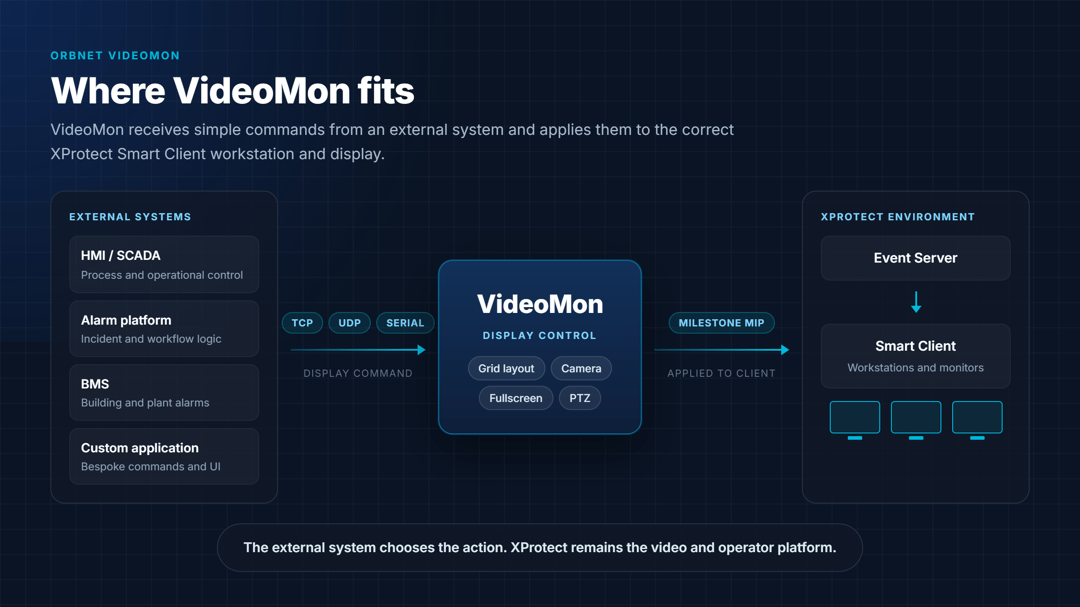
External HMI or automation platform → VideoMon → XProtect Smart Client workstations → Connected monitors
This is particularly useful where the external platform already contains the operational logic.
An industrial HMI may already know which production line has stopped, which alarm has been raised, which cameras cover the affected machinery, which workstation is responsible and which display layout the operator needs. VideoMon provides the practical link between that operational knowledge and the XProtect display.
What Can VideoMon Control?
Flexible Grid Layouts
Create square or rectangular grids that match the situation rather than relying on one permanent view.
Workstation and Monitor Addressing
Target specific Smart Client workstations, monitors, rows, columns and display tiles.
Camera Assignment
Add or remove XProtect cameras from individual display positions using configured identifiers.
Fullscreen Control
Place a selected camera or tile into fullscreen mode when an incident demands immediate attention.
PTZ Control
Control compatible PTZ cameras, including movement, zoom and preset-related actions, from the external workflow.
Smart Client Monitoring
Identify enabled workstations and view connection state, hostname, network information and monitor count.
Configuration Export
Export camera identifiers and detected Smart Client information to simplify external-system configuration.
Remote Client Actions
Refresh or restart VideoMon-enabled Smart Clients remotely where dedicated display workstations require maintenance.
Exporting identifiers may sound like a small feature, but it avoids a surprising amount of commissioning pain. A single mistyped camera identifier can otherwise turn a straightforward control-room workflow into a very confusing afternoon.
Practical VideoMon Use Cases
Transport
Transport Control Rooms
Display platform, entrance, concourse and PTZ cameras automatically for passenger assistance, trespass, lift faults or trackside incidents.
Industry
Manufacturing and Process Control
Present the cameras associated with a production line, machine, safety zone or loading area when an HMI detects a fault.
Facilities
Building Management
Show relevant cameras for fire alarms, plant-room faults, environmental alarms, lift failures or power and cooling incidents.
Security
Alarm and Access Workflows
Use an external workflow to select the correct views for intrusion alarms, access events, perimeter systems and other security incidents.
Example: Intrusion Alarm to Operator Display
- An intrusion alarm is received.
- The external platform identifies the affected zone.
- It selects the associated cameras and target workstation.
- VideoMon creates the display layout and places the cameras.
- A PTZ camera moves to the relevant position where required.
- The operator verifies the incident while the wider workflow continues in the external platform.
VideoMon Versus XProtect Smart Wall
I would not frame this as a straight product contest. VideoMon and Smart Wall overlap in one obvious area—both can change what appears on control-room displays—but they start from different design assumptions.
Smart Wall is Milestone's native shared-wall environment and is available with XProtect Corporate and Expert. VideoMon is our external command-control layer and is supported on Express+, Professional+, Expert and Corporate, including releases as far back as XProtect 2022 R1.
Choose Smart Wall When
- XProtect should own the wall configuration.
- Operators need a native, shared video wall.
- Maps, messages, alarms and other content must appear alongside video.
- XProtect rules and presets can drive the required behaviour.
- Operators should manually send content to the wall.
Choose VideoMon When
- An external platform should own the display logic.
- TCP, UDP or serial command control is required.
- Individual workstations and monitors must be addressed.
- Camera placement must be controlled at tile level.
- The display layout must be built dynamically.
- Smart Wall is not supported by the selected XProtect edition or is not required for the workflow.
In the right estate, both may be used. A central security control room might use Smart Wall, while VideoMon controls Smart Client displays at industrial, transport or operational workstations elsewhere.
The correct choice depends on who owns the operational logic and what the displays are expected to do. If somebody says one universally replaces the other, the workflow discussion has probably been skipped.
When Is VideoMon Not the Right Answer?
This is the part product pages often skip. If a simpler native feature solves the real requirement, adding another product will not make the architecture cleverer.
Saved Views
A normal saved Smart Client view already solves the problem.
Matrix
A single Matrix recipient provides the required result.
Smart Wall Presets
Native presets already provide the required automation.
Simple Events
The external system only needs to create an alarm or event.
Custom Workspace
The project needs a complete bespoke workflow inside Smart Client.
Video Ingestion
The real problem is bringing in or distributing the video source.
A bespoke MIP plug-in may be more appropriate where the customer needs a new Smart Client tab, custom side panel, specialist view item, guided operator workflow or investigation tool.
Likewise, if the difficult part is bringing an unusual video source into XProtect, the project may need Streamforce, ORB Driver or another media integration rather than VideoMon.
Display control should not be used to solve a video-ingestion problem wearing a false moustache.
How VideoMon Fits With Other ORBNET Products
We designed VideoMon to solve the display-control part of a wider XProtect workflow. Each component should still have a clearly defined job.
Event Gateway
Receives and normalises external alarm events that may start the wider workflow.
ORB Driver
Presents supported external video sources as usable XProtect camera channels.
Streaming Engine
Acquires, converts, routes and distributes remote or non-standard video sources.
VideoMon
Controls where the resulting XProtect cameras appear on Smart Client displays.
In a remote-video workflow, Streaming Engine may move and transform the video, ORB Driver may bring the source into XProtect, and VideoMon may then control where the camera appears. The products are complementary because they solve different parts of the chain.
Security and Network Design
Externally controlling security displays should be treated as an operationally sensitive integration.
The command path should not simply be exposed to any device that can reach the network. The design should define:
Command Sources
Which systems are allowed to issue display commands.
Target Clients
Which workstations and monitors may receive them.
Network Path
Which protocols, ports and network zones are involved.
Remote Connectivity
How links across untrusted networks are protected.
PTZ Authority
How external control and operator priority are managed.
Logging and Recovery
How failures are recorded and what happens when the controller is unavailable.
TCP, UDP and serial connections have different characteristics. TCP may suit an established connection where ordered delivery is useful. UDP can provide simple, low-overhead command delivery, but does not inherently confirm delivery. Serial remains relevant in industrial environments and control rooms where established systems still use RS-232 or serial gateways.
The protocol should be selected based on the existing system and operational requirement, not because one acronym looks more futuristic on an architecture diagram.
What Should Be Defined Before Deployment?
✓ Edition and Version
Confirm that the planned VideoMon and XProtect versions are supported together before installation.
✓ Operational Outcome
Specify the target workstation, monitor, layout, camera positions, fullscreen behaviour and what happens when the incident ends.
✓ Workstation and Monitor Naming
Create a stable naming convention for hostnames, workstations, monitors and control-room positions.
✓ Camera Identifiers
Agree how cameras will be referenced and how renamed or replacement devices will be handled.
✓ Protocol and Network Path
Confirm TCP, UDP or serial settings, source and destination, firewall rules, segmentation and recovery behaviour.
✓ PTZ Behaviour
Define presets, continuous movement, operator override, priority and return-to-home behaviour.
✓ Failure Handling
Test offline Smart Clients, disconnected monitors, unavailable cameras, repeated commands, service restart and network interruption.
✓ Acceptance Criteria
Measure workstation selection, grid creation, camera placement, response time, PTZ operation and recovery after restart.
✓ Support Ownership
Define who supports the external system, VideoMon, XProtect and later changes to identifiers or network rules.
A successful acceptance test should prove more than “the camera appeared once”. It should also prove predictable behaviour during failure, restart and recovery.
Conclusion
VideoMon is not simply another way to build a video wall.
It allows the system that already understands the operational situation to control what the operator sees inside XProtect Smart Client.
The right answer may still be Smart Wall, Matrix or a native XProtect rule. If one of those solves the problem cleanly, I would use it.
VideoMon becomes particularly useful when an external HMI, automation platform or control system must control specific Smart Client workstations, monitors, grids and camera positions using TCP, UDP or serial commands.
Because it does not depend on XProtect Smart Wall, VideoMon can provide this command-driven workflow on Express+, Professional+, Expert and Corporate deployments.
If I had to reduce the whole design decision to one question, it would be this:
The deciding question is not “Do we need a video wall?” It is: Which system should own the display logic?
Frequently Asked Questions
What is VideoMon for Milestone XProtect?
VideoMon is our integration for allowing external HMIs, automation platforms and control systems to manage XProtect Smart Client displays using TCP, UDP or serial commands.
Does VideoMon require XProtect Smart Wall?
No. VideoMon is separately licensed, but it controls XProtect Smart Client displays without requiring a Smart Wall licence or Smart Wall installation.
Does VideoMon work with XProtect Express+ and Professional+?
Yes. VideoMon is supported on XProtect Express+, Professional+, Expert and Corporate, including releases as far back as XProtect 2022 R1.
Does VideoMon work with every XProtect release?
VideoMon supports XProtect releases from 2022 R1 onward. Earlier XProtect releases are not supported.
Does VideoMon replace XProtect Smart Wall?
Not necessarily. Smart Wall is Milestone's native collaborative video-wall solution. VideoMon is aimed at projects where an external system needs command-driven control of Smart Client displays.
Can VideoMon and Smart Wall be used in the same XProtect deployment?
Yes. A central security control room may use Smart Wall for a collaborative Milestone-managed wall while VideoMon controls Smart Client displays at industrial, transport or operational workstations elsewhere on the same estate.
Does the external control system need to receive or restream the XProtect video?
No. The external platform sends commands that tell VideoMon what the XProtect Smart Client displays should do. XProtect remains responsible for presenting the video.
Can an alarm automatically change an XProtect display?
Yes. Native XProtect rules can change Smart Wall content or send cameras to Matrix recipients. VideoMon becomes useful when an external workflow platform needs more precise control over workstations, monitors, grids and individual tiles.
Can VideoMon control several monitors?
Yes. VideoMon can address individual enabled Smart Client workstations and their connected monitors.
When should I use a custom MIP plug-in instead?
A custom MIP plug-in is usually more appropriate when the requirement is a bespoke Smart Client workspace, side panel, view item, search tool or operator workflow rather than external command-based display control.
ORBNET Systems
Need to Connect an External Control System to XProtect Displays?
Send us the workflow rather than just the requested product name. We can help work out whether it is best served by VideoMon, Smart Wall, Matrix, native XProtect automation or a custom integration.
Explore VideoMon