ORB Driver for Milestone XProtect · Part of StreamForce
Bring specialist video sources into Milestone XProtect
ORB Driver runs on your XProtect Recording Server and presents RTSP, SRT, MJPEG, MP4 and other supported sources as native, manageable cameras. Up to four streams per camera, plus GPS/NMEA, audio and metadata. No custom MIP development and no separate viewer.
RTSPRTSPSSRTHTTP(S) MJPEGMxPEGMP4NMEA 0183
Start your 30-day trialDownload the manual
The trial starts automatically on installation. ORBNET and Milestone device licences are both required.
Sources
RTSP / RTSPS
SRT
MJPEG / MxPEG
MP4, images, NMEA
↓
XProtect Recording Server
ORB Driver
Up to 4 streams per camera · audio · metadata · GPS · events
↓
Milestone XProtect
Management Client & Smart Client
Configure, license, view, record, play back and use in rules
The integration problem
The video works. XProtect just can’t use it.
A feed that plays perfectly in a standalone player can still be awkward to bring into a VMS. The usual workarounds cost time and money:
- Custom MIP development to introduce a single source
- Separate viewing applications that sit outside operator workflows
- Ad-hoc streaming bridges that need their own maintenance
- Repeated engineering every time a new source arrives
The ORB Driver approach
One configurable driver, inside XProtect
Install ORB Driver on the Recording Server, add ORBNET hardware in Management Client and point each camera at its source. It then behaves like any other XProtect camera for live view, recording, playback and rules.
Source → ORB Driver (Recording Server) → Management Client → Smart Client
Capabilities
Built for more than conventional camera streams
Flexible ingestion, multistreaming, optional transcoding and operational metadata, all configured through the XProtect Management Client.
Broad source support
RTSP, RTSPS, SRT, HTTP/HTTPS MJPEG and HTTP MxPEG, plus local MP4 files, JPG/PNG images and image folders. UDP MPEG-TS and RTP are available as advanced options; test them with your source first.
Four streams per camera
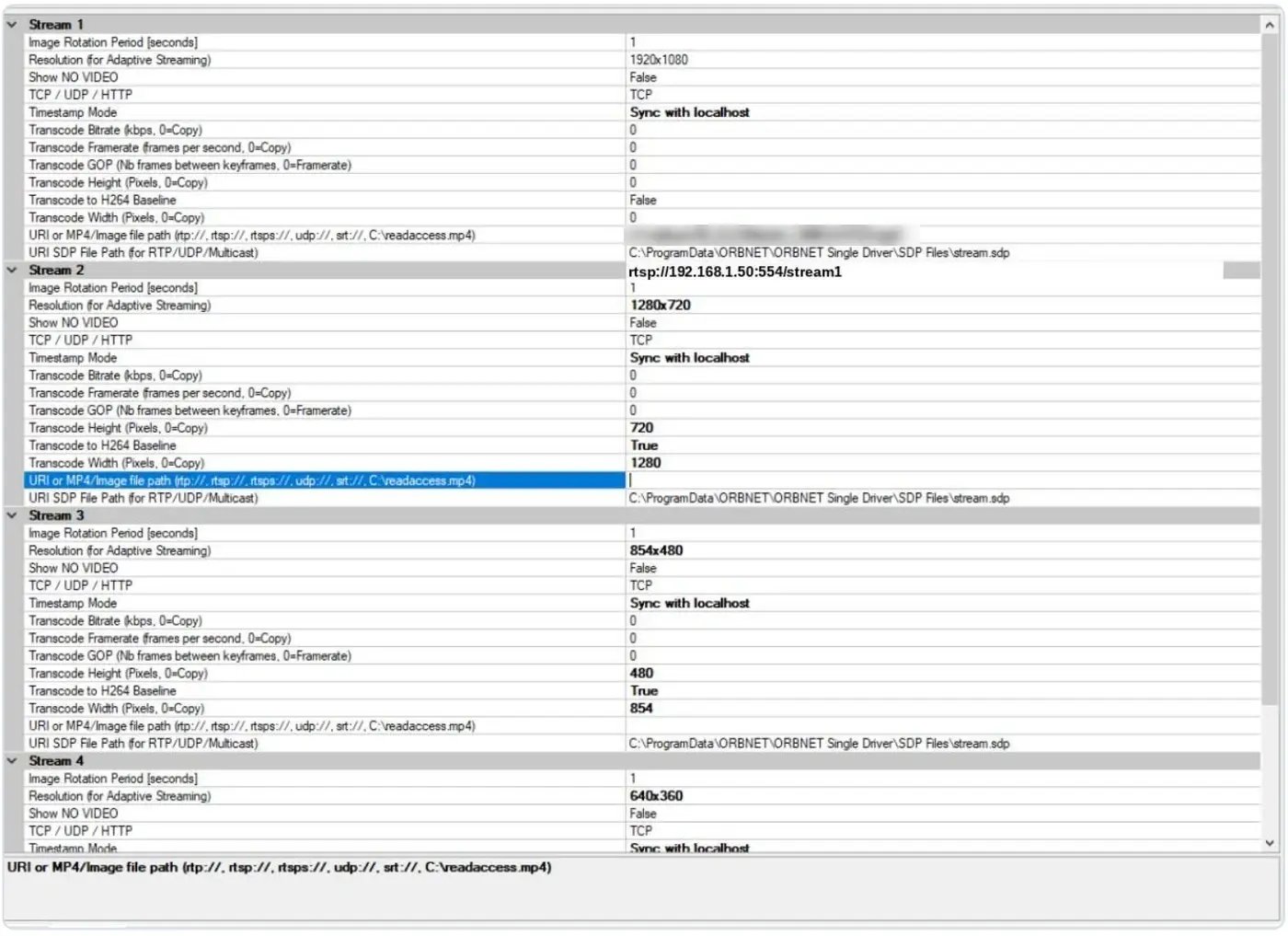
Each Single Driver camera carries up to four independently configured streams. Each can point at a different source or quality: a main stream, a sub stream or another device.
Adaptive streaming
Give each stream an advertised resolution and Smart Client picks the closest match for each view: full resolution for a large tile, a lighter stream for a busy video wall. The advertised value labels a stream; it does not resize it.
Optional transcoding
Re-encode a stream to H.264 Baseline with your own width, height, bitrate, frame rate and GOP. It is optional and uses Recording Server CPU, so use a camera’s native sub streams wherever you can.
GPS and NMEA
Accepts NMEA 0183 RMC and GGA sentences over TCP (client or server), or replays a looping NMEA file. Updates from 100 ms to 60 s, plus random-movement simulation. Positions are delivered as live metadata.
Audio, metadata and events
Embedded or separate microphone audio. RTSP/ONVIF and TCP text metadata with alerts, overlays and automatic bookmarks. Video started/stopped and metadata events drive XProtect rules and alarms.
Multistreaming
One camera, four streams, the right one for every view
Smart Client’s adaptive streaming requests the stream closest to each view size, cutting bandwidth and decode load on busy layouts.
- Stream 1 carries the full-resolution source, passed through unchanged.
- Streams 2–4 can use a camera’s sub streams, a different device, or an optional H.264 transcode of the same source.
- Advertised resolution tells Smart Client what each stream delivers. Set it to the real output size.
Skip transcoding when you can. If the camera already offers a 720p sub stream, use it as Stream 2. It costs no Recording Server CPU.
Camera or encoder main & sub streams, another device, or one source transcoded
↓
↓
Adaptive streaming requests the stream closest to each view size
Default advertised resolutions shown. Streams 2–4 are inactive until given a source.
Use cases
Connect the video your operations depend on
Where a source delivers a supported stream or file, ORB Driver brings it into the XProtect environment your operators already use.
Drone and mobile video
Bring live video from drone and mobile platforms that output a compatible stream, such as RTSP or SRT. Compatibility depends on the platform’s stream output; this is not a native integration with any specific drone or bodycam system.
Remote sites over SRT
SRT’s reliable transport suits lossy or long-distance links from remote facilities, temporary installations and mobile deployments.
Demonstrations and simulation
Present a local MP4 file as a looping XProtect camera for repeatable demos, training and test environments. A file source behaves as a camera feed; it is not an evidence import tool.
GPS-enabled mobile assets
Pair video with live NMEA positions and TCP text metadata, giving operators location and operational context, with alerts and bookmarks.
Multi-camera load testing
Multi Driver creates many virtual cameras from one hardware device for demos, bulk file playback and Recording Server load tests. It is not intended for production.
Native XProtect experience
Familiar administration. More flexible video.
ORB Driver is a device driver, not a separate VMS. Administrators use the normal Management Client hardware workflow; operators use Smart Client as usual.
Install
Driver on each Recording Server; plug-in on Management Client
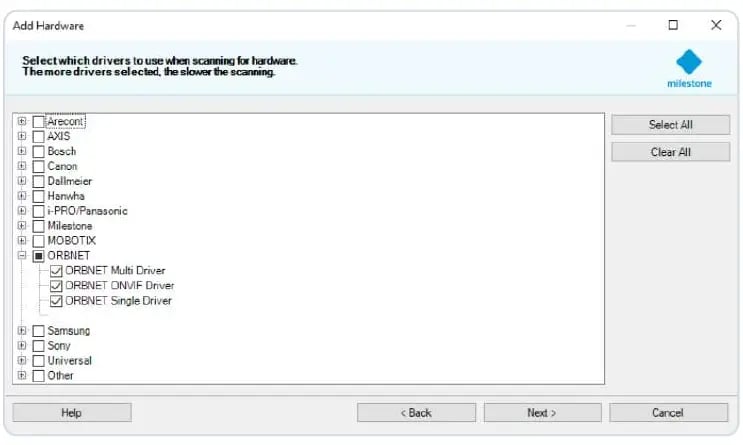
Add hardware
Manual detection, ORBNET Single Driver
Configure source
Enter the URI or file path for each stream
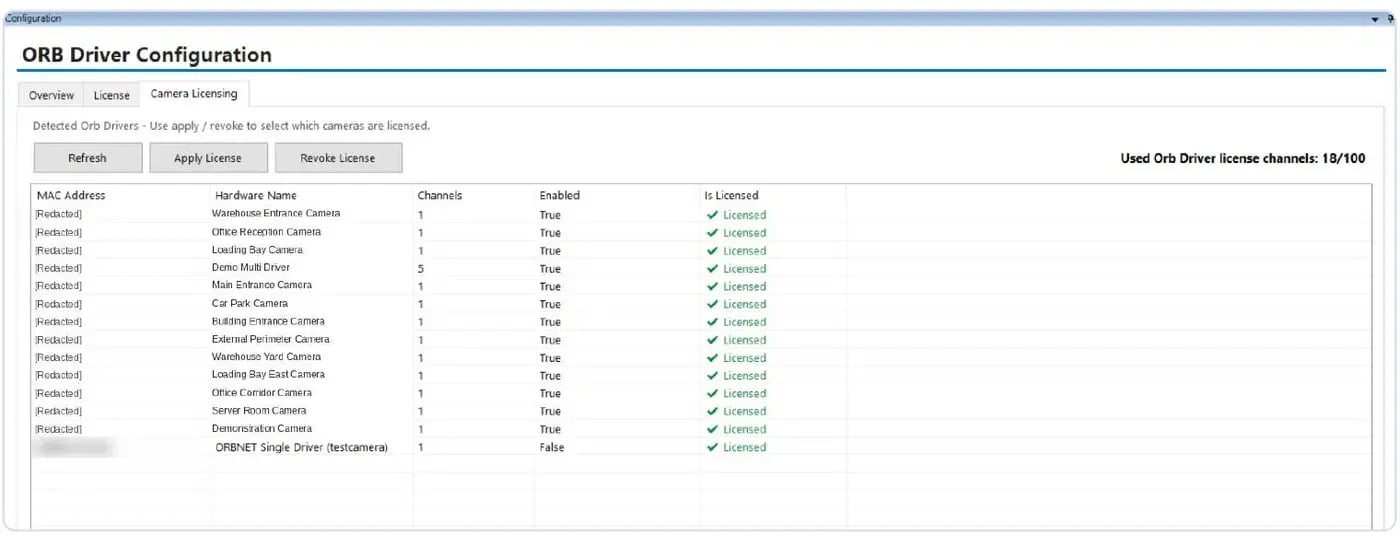
Verify licensing
Confirm the camera shows Licensed
View and record
Live, recording, playback and rules in XProtect
See it in Management Client

Three driver editions
Recommended for production
ORBNET Single Driver
One camera with up to four streams, microphone, metadata, GPS/NMEA, virtual outputs and events.
Demos and testing
ORBNET Multi Driver
Many virtual cameras from one hardware device, for simulations, bulk file playback and load testing.
Beta
ORBNET ONVIF Driver
Reads media profiles from compatible ONVIF cameras. Not ONVIF-certified; test with your camera model and firmware before operational use.
FAQ
ORB Driver questions, answered
What is ORB Driver?
ORB Driver is a device driver for Milestone XProtect, made by ORBNET Systems. It runs on the XProtect Recording Server and presents external video, audio, GPS and metadata sources as native XProtect devices for live view, recording, playback and rules.
Which video sources does ORB Driver support?
RTSP, RTSPS, SRT, HTTP/HTTPS MJPEG and HTTP MxPEG streams, local MP4 files, and JPG/PNG images or image folders. UDP MPEG-TS and RTP are advanced options that should be tested with your source.
Does ORB Driver support RTMP, HLS or WebRTC?
Not directly. ORBNET Streaming Engine, also part of the StreamForce ecosystem, can ingest RTMP, HLS or WebRTC and redistribute the stream as RTSP or SRT, which ORB Driver ingests.
Where is ORB Driver installed?
The driver installs on every XProtect Recording Server that hosts ORBNET hardware. A companion plug-in installs on Management Client computers for licensing and configuration, and on the Event Server if you use ORBNET events.
Does ORB Driver support XProtect adaptive streaming?
Yes. Each Single Driver camera can carry up to four streams, each with its own source and advertised resolution, so Smart Client can pick the stream closest to each view size. Transcoding is optional.
Can ORB Driver bring GPS data into XProtect?
Yes. It accepts NMEA 0183 RMC and GGA sentences over TCP or from a replayed NMEA file, with updates as often as every 100 ms. Positions are delivered as live metadata, not as historical positioning playback.
How is ORB Driver licensed?
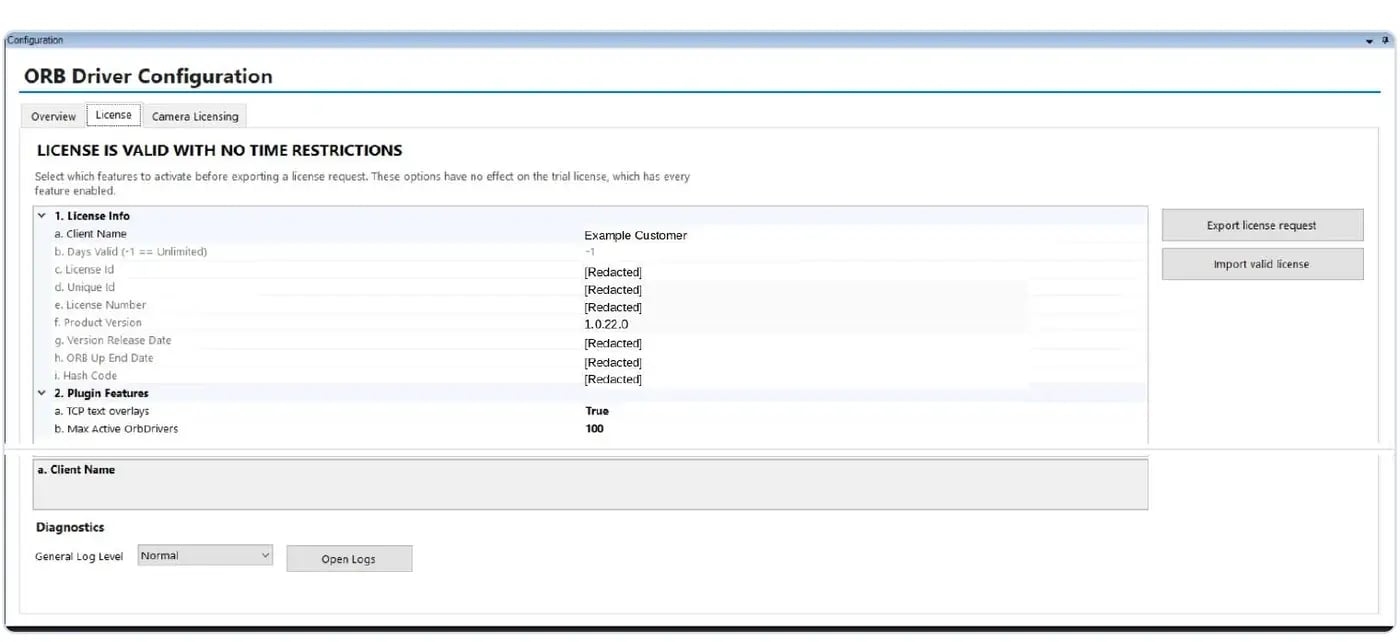
A 30-day trial starts automatically on installation. After that, each camera needs an ORBNET camera-channel licence and a Milestone XProtect device licence, which are managed separately.
The StreamForce ecosystem
Part of a complete video ingest toolkit
ORB Driver works seamlessly with ORBNET Streaming Engine and StreamLink, so sources that need protocol conversion or secure transport from the edge can still reach XProtect.
You are here
ORB Driver
Presents supported streams, files, GPS and metadata as native XProtect devices on the Recording Server.
Protocol conversion
Streaming Engine
The conversion and distribution layer. It ingests RTSP, SRT, RTMP, HLS and WebRTC and redistributes in any supported protocol, so sources ORB Driver can’t take directly can still reach XProtect.
Explore Streaming Engine →Edge contribution
StreamLink
A lightweight edge application that ingests local ONVIF or RTSP sources and forwards them securely over SRT to Streaming Engine, ideal for remote and distributed sites.
Try it in your own environment
Ready to bring more video into XProtect?
ORB Driver includes a 30-day trial that starts automatically when you install it. Test your own sources, streams and Recording Servers before you commit.
Download ORB Driver and manualBook a call
Not sure your source is compatible? Book a call to talk through protocol, codec and deployment.
Before you install
- A running, supported XProtect system with a Recording Server and Management Client access
- Local administrator rights on each computer that receives an installer
- A maintenance window, as the installer can restart XProtect services
- A source the Recording Server itself can reach
Licensing
- 30-day trial starts automatically on installation
- After the trial, a purchased ORBNET camera-channel licence
- Every ORBNET camera also needs a Milestone XProtect device licence; the two are managed separately